
A travel router makes the most sense when your hotel room needs to function as a temporary office. You unpack a laptop, phone and tablet; instead of rebuilding each connection, you connect them to a network you have already configured. The useful question is whether that convenience is worth another device, cable and setup screen.
Our research-based recommendation is to start with the GL.iNet Beryl AX, model GL-MT3000, as a feature reference. Compare alternatives against its setup documentation, ports and power requirements rather than buying the model with the largest Wi-Fi number. This guide evaluates published specifications and workflows; it does not claim a comparative hotel speed test.
Start with the kind of connection you need
A travel router and a cellular hotspot solve different problems. A router can distribute an existing connection. A cellular hotspot supplies internet access through a mobile subscription. Buying a travel router does not create free internet in a room with no working connection.
For a hotel, the practical starting points are an authorized Ethernet connection or an existing guest Wi-Fi network. GL.iNet documents Ethernet, repeater and tethering options separately. The availability of an option on a particular router and firmware should be checked before purchase. GL.iNet connection documentation.
Ask the property whether personal routers are allowed and whether an in-room Ethernet socket is active. A visible socket may be disconnected or reserved for equipment. If the hotel sells a particular access tier or limits the devices covered by your booking, ask about permitted sharing rather than assuming a router changes those conditions.
The features worth comparing
Swipe or scroll the table sideways to compare every column.
| Feature | Why it matters in a hotel | Question to answer before buying |
|---|---|---|
| Captive-portal guidance | Many guest networks require a browser login | Does the manufacturer explain this exact workflow? |
| Ethernet WAN | Offers an alternative to receiving guest Wi-Fi wirelessly | Is the property connection authorized and active? |
| Ethernet LAN | Useful for a laptop adapter or other wired device | Will you pack the necessary cable? |
| USB-C power | Can simplify the travel kit | What voltage and current does the router require? |
| VPN client | Can apply a configured tunnel to connected devices | Does your provider and account support it? |
| Maintained firmware | Supplies fixes and current setup instructions | Is your exact model still supported? |
The GL-MT3000 has a 2.5Gbps WAN port, a gigabit LAN port and a USB-C power input specified at 5V/3A. Those are manufacturer specifications, not a forecast of hotel internet speed. Its USB-C socket is a power input; do not mistake its shape for a laptop-style display or data connection. Beryl AX specifications.
Captive portals are the real buying consideration
A captive portal is the page asking for a room number, surname, access code or acceptance of network conditions. Connecting to the wireless network and completing that page are separate events. A router can show a wireless connection while the internet remains unavailable.
GL.iNet provides a dedicated public-hotspot workflow. On supported firmware, its login mode can temporarily suspend services and change DNS handling to help the portal load. The documentation specifically warns that this can expose network activity to the hotspot provider. Complete authentication before assuming your usual privacy configuration is active. Official captive-portal guidance.
If authentication fails, stop and ask hotel support whether the router can be registered. Avoid using address-cloning features to evade a paid tier, device policy or other access restriction. The goal is a supported connection that survives the next meeting, not a fragile workaround you must rebuild each morning.
A sensible arrival routine
Prepare the router at home: install current stable firmware, set distinct administrator and Wi-Fi passwords, and save the instructions where you can read them offline. Pack its approved power supply and a short Ethernet cable. A late check-in is a poor time to discover that your spare charger cannot supply the required power.
At the hotel, confirm the permitted network, join it through the router's documented interface and complete any browser login. GL.iNet's repeater mode normally creates a separate subnet with a firewall between connected devices and the upstream network. That is a useful arrangement, but it is not a guarantee against malicious websites, compromised devices or every network threat. GL.iNet repeater setup.
Then check three ordinary tasks: open the websites you need, make a short call and transfer a representative work file. A connection that passes a speed test can still behave poorly with your actual applications. If you enable a VPN, repeat those tasks after it connects; employer systems and hotel networks may impose their own requirements.
What the speed label cannot tell you
An AX3000 label describes a wireless product class. It does not promise a 3Gbps internet connection. Your useful speed also depends on the hotel's service, congestion, router placement and the connection between the router and guest network.
Consider where you will put the device. A router buried behind a television or tucked into luggage is less convenient to manage than one placed in the open with reasonable ventilation. Keep the setup simple enough that you can pack it without leaving a power supply behind.
Who should buy one?
A frequent traveler carrying several devices has the strongest case. A couple sharing a room may appreciate a familiar network, and an Ethernet option can be useful where the property supports it. Someone taking a single phone on a short holiday may gain very little.
Before ordering, check the exact GL-MT3000 listing, included power accessories, seller and return terms. A product picture should show that model rather than another Beryl generation. Buy for a repeatable connection routine and useful ports; let the hotel's actual network determine the performance expectations.
Explore the options
Exact product examples for the choices discussed in this guide. Confirm the selected variant, current seller and return terms before ordering.
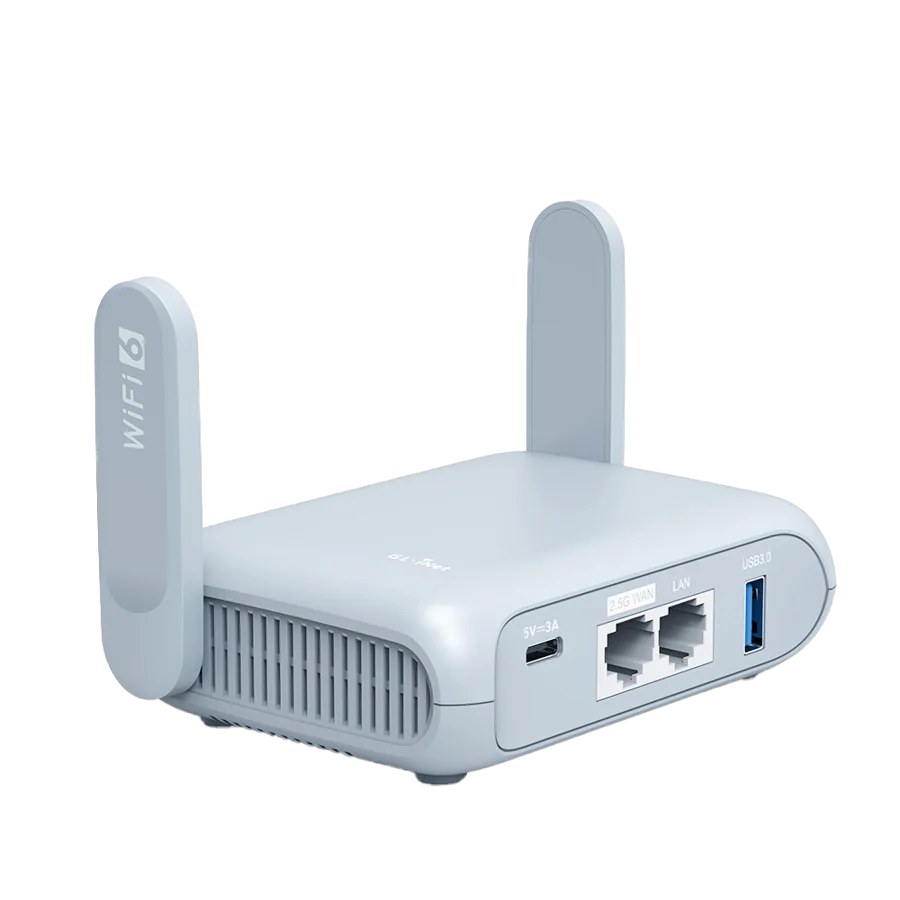
GL.iNet Beryl AX — GL-MT3000
A travel-router example for a small personal network behind a permitted hotel connection.
As an Amazon Associate I earn from qualifying purchases. We may earn a commission from qualifying purchases through this button.
View exact product on Amazon ↗ (paid link)