An AI recorder can make capturing a conversation feel wonderfully simple. Press a button, put the device down, and return later to something you can search. A phone can already do much of that. The useful comparison starts with what happens between speaking and having a reliable, portable record.
Our view: begin with the phone you own. Buy dedicated hardware when it solves a specific recording problem, and assess the transcription service as a separate purchase. A polished summary cannot rescue missing audio, and an attractive device does not establish good software terms.
Three jobs hiding inside one product
Recording captures audio. Transcription turns speech into text. Summarization interprets that text into notes, tasks or a narrative. Each deserves its own decision.
For recording, consider microphone placement, battery, storage, visible recording status and whether starting a session is easy. For transcription, consider your language, names, specialist vocabulary and the ability to correct mistakes. For summaries, consider whether important qualifications disappear when a long discussion becomes a few confident paragraphs.
A recorder advertised with AI may depend on a phone and cloud account for the second and third jobs. Before buying, establish which functions work without a subscription, internet connection or active manufacturer service. Those are model-specific questions.
What your phone already offers
Apple documents viewing and copying Voice Memos transcripts on supported iPhones, with language and regional limitations. Check the current compatibility information for your own device instead of assuming every iPhone has identical features. See Apple’s Voice Memos transcription guide.
Export matters just as much as transcription. Apple’s sharing options include a rendered M4A audio file; that gives you an audio copy you can retain independently of a summary. The exact controls depend on the installed software. See Apple’s recording-sharing instructions.
On supported Pixel devices, Google documents sharing audio or transcript files and copying a transcript to Google Docs. Its guide also distinguishes local recordings from recordings you choose to back up or share. These are useful examples of capabilities to look for in any phone app, rather than reasons to replace a working phone. See Google’s recording and transcript export guide.
Where dedicated hardware can earn its place
A separate recorder may suit someone who repeatedly forgets to open a phone app, wants the phone free for reference material, or needs more convenient microphone positioning. A visible, deliberate recording device can also make the start of a consented session clearer to everyone involved.
None of those advantages proves that a particular microphone will sound better across a meeting table. Distance, room reflections, competing voices and clothing noise still matter. A tiny wearable microphone and a centrally placed phone face different problems; neither has an automatic advantage in every room.
For interviews, try a short sample from the actual seating arrangement. For personal dictation, compare a quiet-room note with a realistic walking note. Listen to the original files before reading the summaries. This is a useful purchase test, not a claim that we have run it for every device.
A real example from the Editors’ purchases
The magnetic recorder in our recent-purchases section is identified by ASIN B0FHGQR6KL. Its Amazon title describes a magnetic kickstand, microphone, smartphone app and unlimited AI translation. Those remain seller claims; the listing is not evidence that its software is equivalent to a better-known recorder ecosystem. The exact product is linked in the buying section below.
We have not independently established this Generic-branded product’s app publisher, subscription schedule, export guarantees or transcription performance. It therefore remains a research candidate. We would confirm those details before choosing it for important work. Its photograph identifies the actual item; it does not imply an editorial performance award.
Read our existing recorder assessment for the current limitations of the evidence.
Work out the cost of your actual month
A low hardware price can obscure a service that charges for the work you bought it to perform. Write down your expected monthly audio first. Eight 45-minute conversations make 360 minutes; weekly one-hour meetings across four weeks add another 240. That hypothetical workload totals 600 minutes before retries or personal notes.
Then ask whether minutes are counted at recording, upload or transcription, whether unused allowances roll over, and whether summaries consume a separate allowance. Check cancellation and continued access to existing files. Do not calculate long-term value from an introductory promotion alone.
Plaud illustrates why this distinction matters, although it is a separate ecosystem from the Generic recorder pictured here. Its current v4 documentation lists 300 monthly Starter transcription minutes after binding a Plaud device and 1,200 on Pro; paid allowances replace the Starter allowance. It also distinguishes transcription minutes from credits used for a separate Ask Plaud mode. That is a plan structure to understand, not a subscription promise for another brand. See Plaud’s current transcription-minute guide.
The export test comes before the commitment
Use an ordinary sample recording and confirm you can save the original audio, readable transcript and corrected notes somewhere you control. Open those exports outside the recorder app. Check that filenames and dates make sense and that a shared link has the intended audience.
Keep the raw recording until the transcript and any actions have been checked. A speaker label is an automated suggestion until verified. Summaries can confuse a possibility with a decision or lose the word “not.” Review amounts, names and commitments against the audio.
Record only with appropriate permission, and choose storage and processing that suit the material. For sensitive workplace discussions, the organization’s approved process should guide the app choice.
Our buying decision
For occasional dictation and ordinary notes, an existing phone is the sensible starting point. A dedicated recorder becomes more persuasive when its physical workflow makes you capture useful material consistently and its software passes the export and cost checks.
Choose the combination that leaves you with usable audio, understandable charges and a record you can take elsewhere. That is a more durable advantage than a long list of AI features on a box.
Explore the options
Product examples discussed in this guide. Confirm the exact variant, selected seller and current terms before ordering.
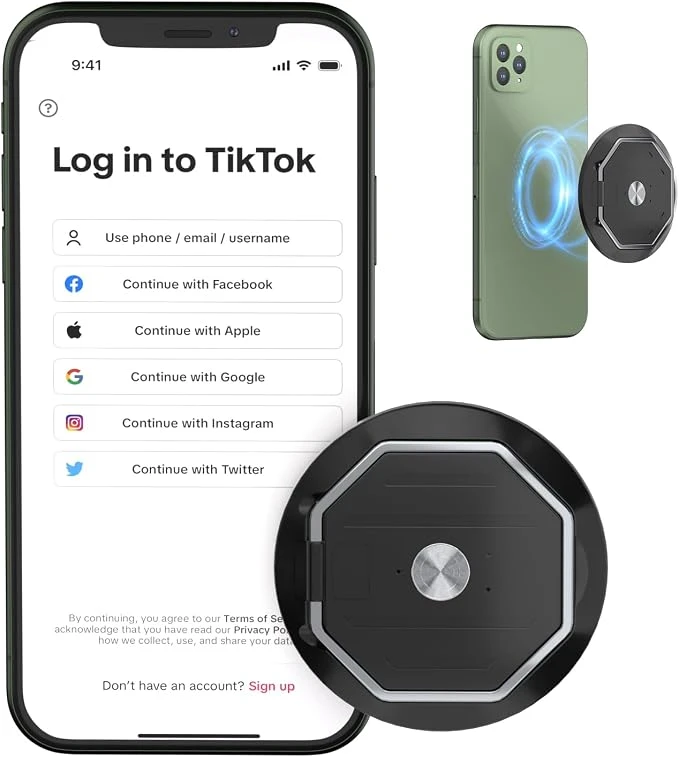
Magnetic AI voice recorder — Generic
The exact recorder from the Editors’ purchases, retained as an inspect-before-buying research candidate.
As an Amazon Associate I earn from qualifying purchases. We may earn a commission from qualifying purchases through this button.
View exact product on Amazon ↗ (paid link)